Professional Cloud Configuration

From keypad design to a live, monitored home — one platform.

Domex Cloud is the platform behind every Domex installation. Domex PCC is the professional’s side of it — one web workspace where distributors, dealers and installers run the whole business: design a keypad, quote the project, hand over the home, and watch it live. Nothing to install.

Roles & hierarchy

One cloud, four workspaces.

Every level of the Domex chain works in the same platform — each with the view it needs, and nothing it doesn’t.

Regional distributor

Distribution

Backs the dealer network — onboarding new dealers, training them on the platform and standing behind them on live projects.

Integrator / dealer

Dealer

Customers, projects, quotes, keypads, live monitoring and support.

Field installer

Installer

A per-project working context, scoped under the dealer.

Homeowner

Customer

Controls the entire home from the Domex app or the web app — lighting, climate, shading and scenes, anywhere.

Every account gets a CloudID — a single identity that follows the project from first quote to a live, monitored home.

Create Keypad

A CAD-grade designer for real glass.

What you see is the actual faceplate — 125×85 mm horizontal or 85×125 mm vertical — drawn to scale on photo-real renders, and the picker only offers what Domex can really manufacture.

Domex glass keypad render used in the Create Keypad designer
To-scale preview

Design it exactly as it will be made.

Three collections — Core, Diviso and Sculptured — in gloss and matte, six colours, horizontal and vertical (Crestron) orientations, P3 and P4 plates. Every configuration from 1–9 light switches to motor and shutter combos (M1, M2, M3, L2M1, L2M2, L4M1), Master and blank-off.

Engraving studio.

Per-button text and icons from the original Domex Design icon library — 139 icons across 23 categories, from lighting and HVAC to media, scenes, security and hotel. Multiple text and icon layouts including shared-label pairs, live LED preview and millimetre-accurate positioning.

Artwork Approval, ready for the laser.

Every design produces a one-page, print-ready PDF with exact dimensions and engraving coordinates in millimetres, plus a vector export the laser can run (LightBurn). It’s the document your customer signs before production.

Core · Diviso · Sculptured Gloss & matte 6 colours Horizontal & vertical 139 engraving icons Design → basket → order
The flow

A project, end to end.

Add the customer, lay out the home, design the keypads, quote it, hand it over and monitor it — these are the real screens, in the order you use them.

Step 01 · Dealer Portal

Your whole business on one home screen.

Open PCC and the day is already in front of you — every customer, every project, every keypad waiting to be designed. Live counts on each card mean you never go looking for the work.

  • See every home you look after, and which ones need you today
  • Jump straight into designing a keypad or building a project
  • Follow every job from first idea to installed and running
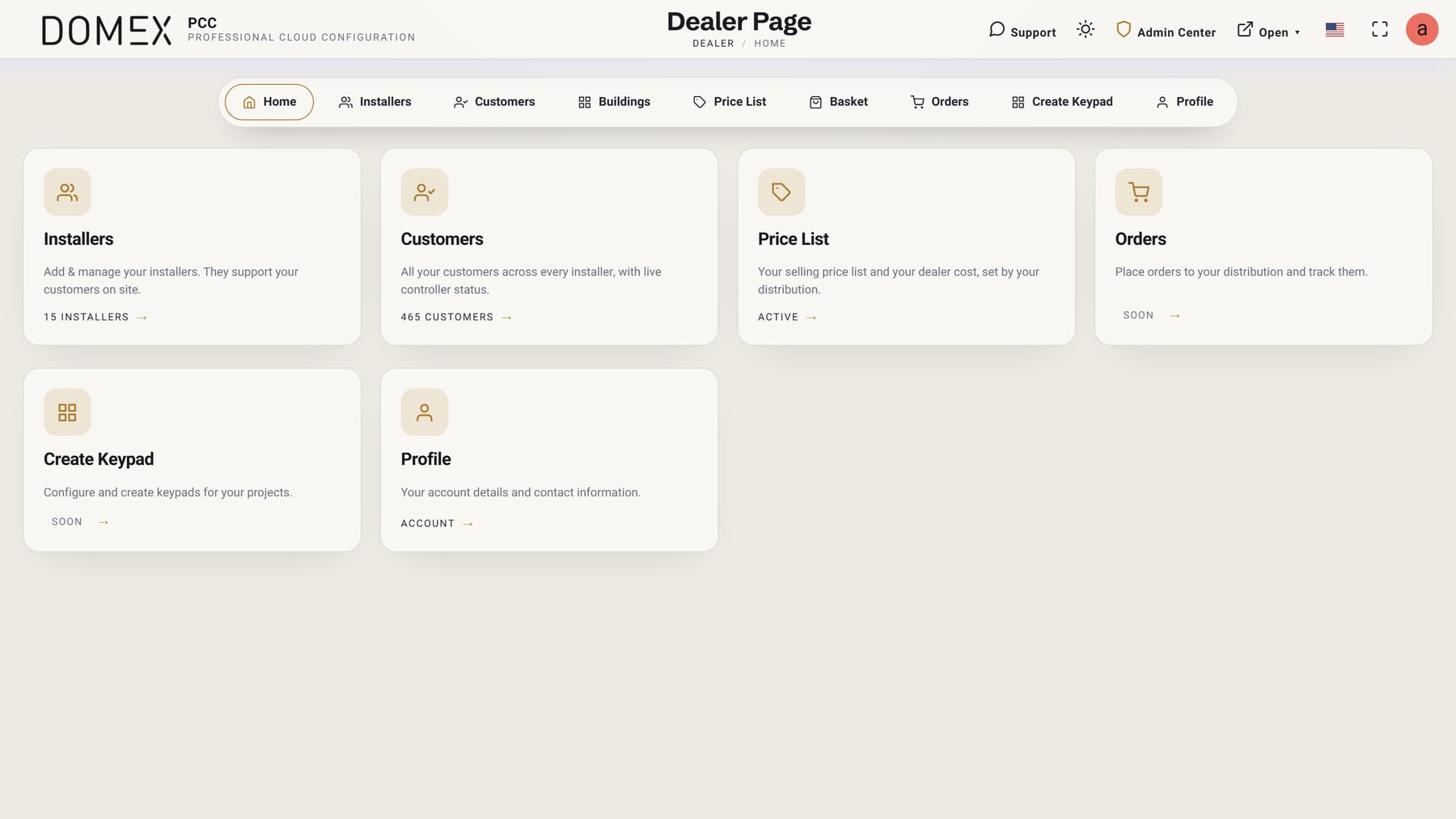
Domex PCC dealer portal home screen with Installers, Customers, Price List and Orders cards
Step 02 · Build the project

The floor plan becomes the project.

Upload the blueprint and place every device where it really goes — keypads, dimmers, boilers, thermostats, cameras, KNX and third-party gear. Areas hold devices; devices hold endpoints; associations wire one control to another.

  • Areas per floor or room, plus All Areas and Project Monitor views
  • Per-endpoint names and icons — they seed the keypad engraving later
  • Export, import and apply settings straight to site
Domex PCC project dashboard showing devices placed on a villa floor plan
Step 03 · Create Keypad

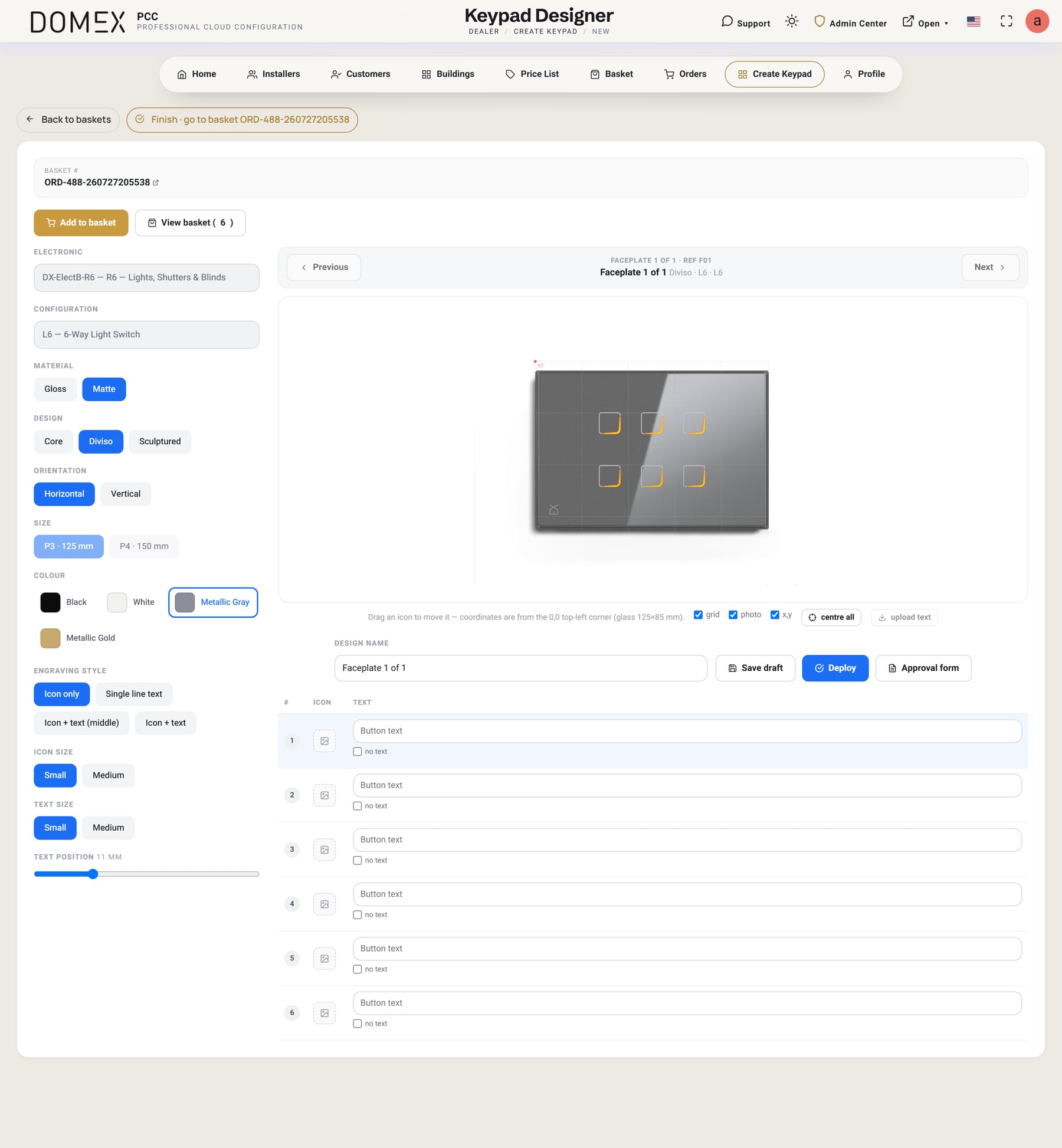
Engrave it to the millimetre.

Pick the electronics and configuration, the design line, finish, colour, orientation and plate size — then engrave each button with an icon, text, or both. The preview is the real glass — 125×85 mm horizontal, 85×125 mm vertical — and coordinates read from the 0,0 corner.

  • Horizontal or vertical installation — the engraving rotates with it
  • Icon only, single-line text, icon + text or icon + text (middle)
  • Pull the installer’s endpoint names in as default button labels
  • Save a draft, deploy to the basket, or print the Approval form
Domex PCC keypad designer with material, design, colour, orientation and per-button engraving controls
Step 04 · The customer quote

A proposal the customer actually enjoys reading.

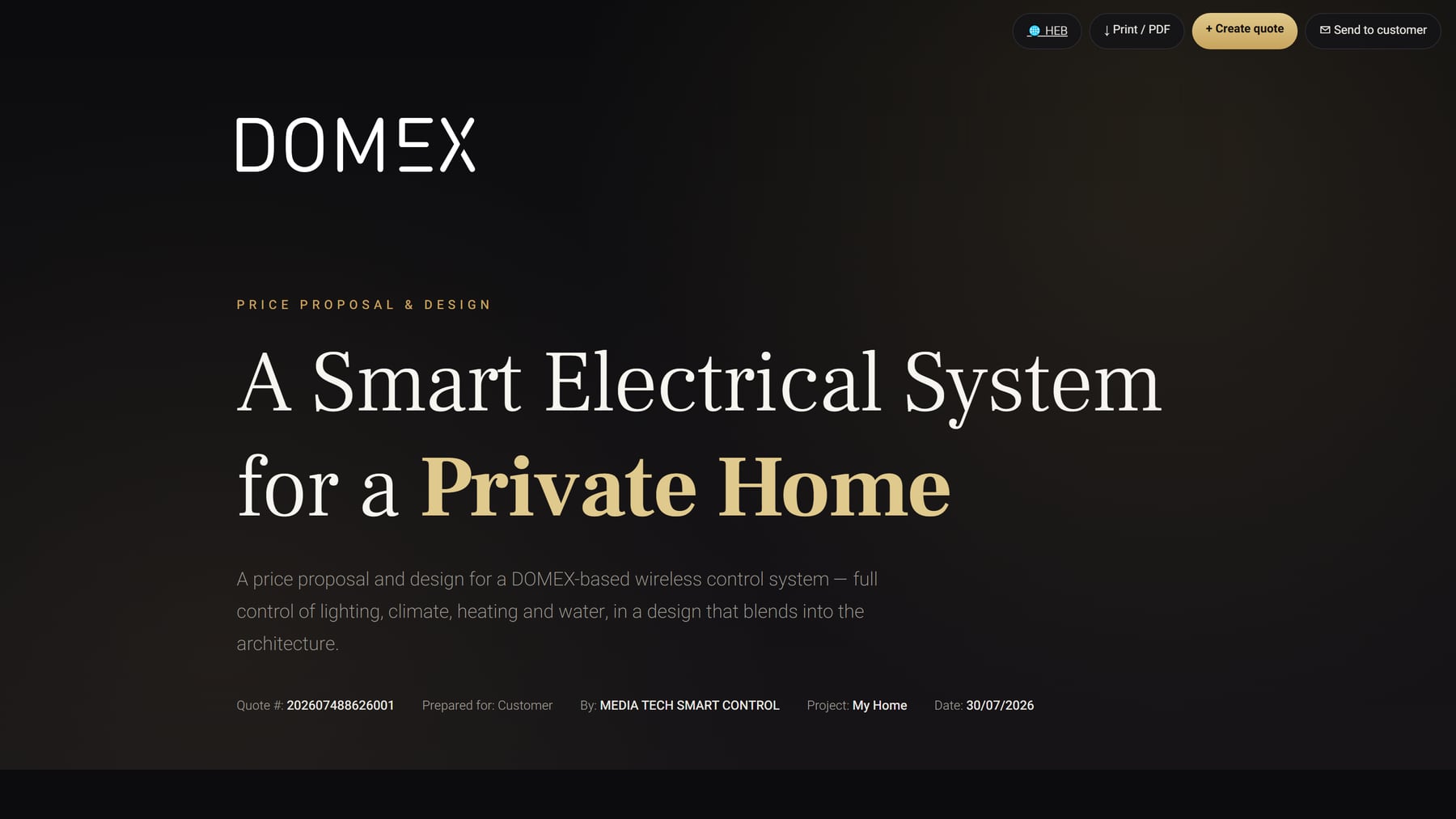
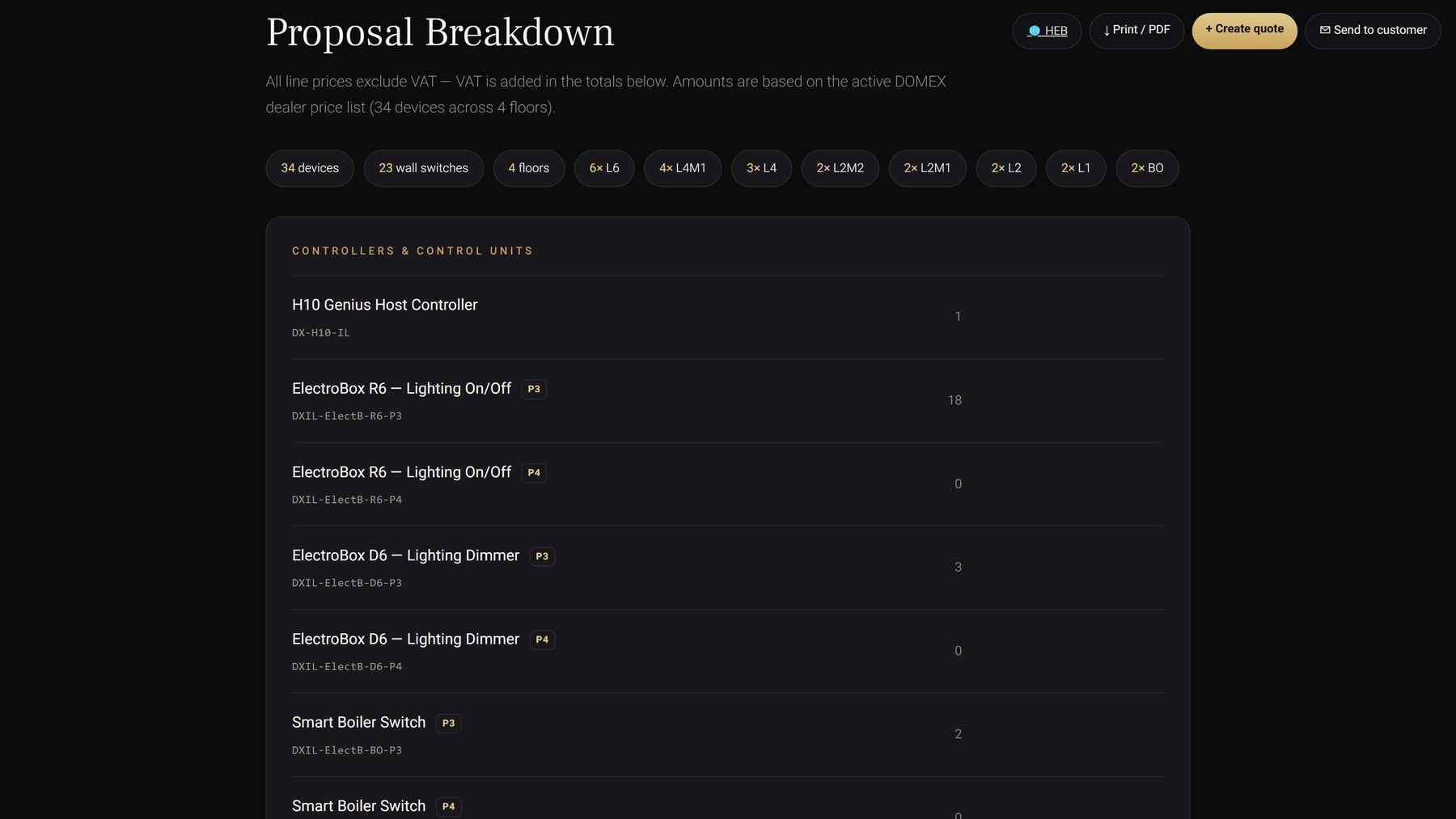
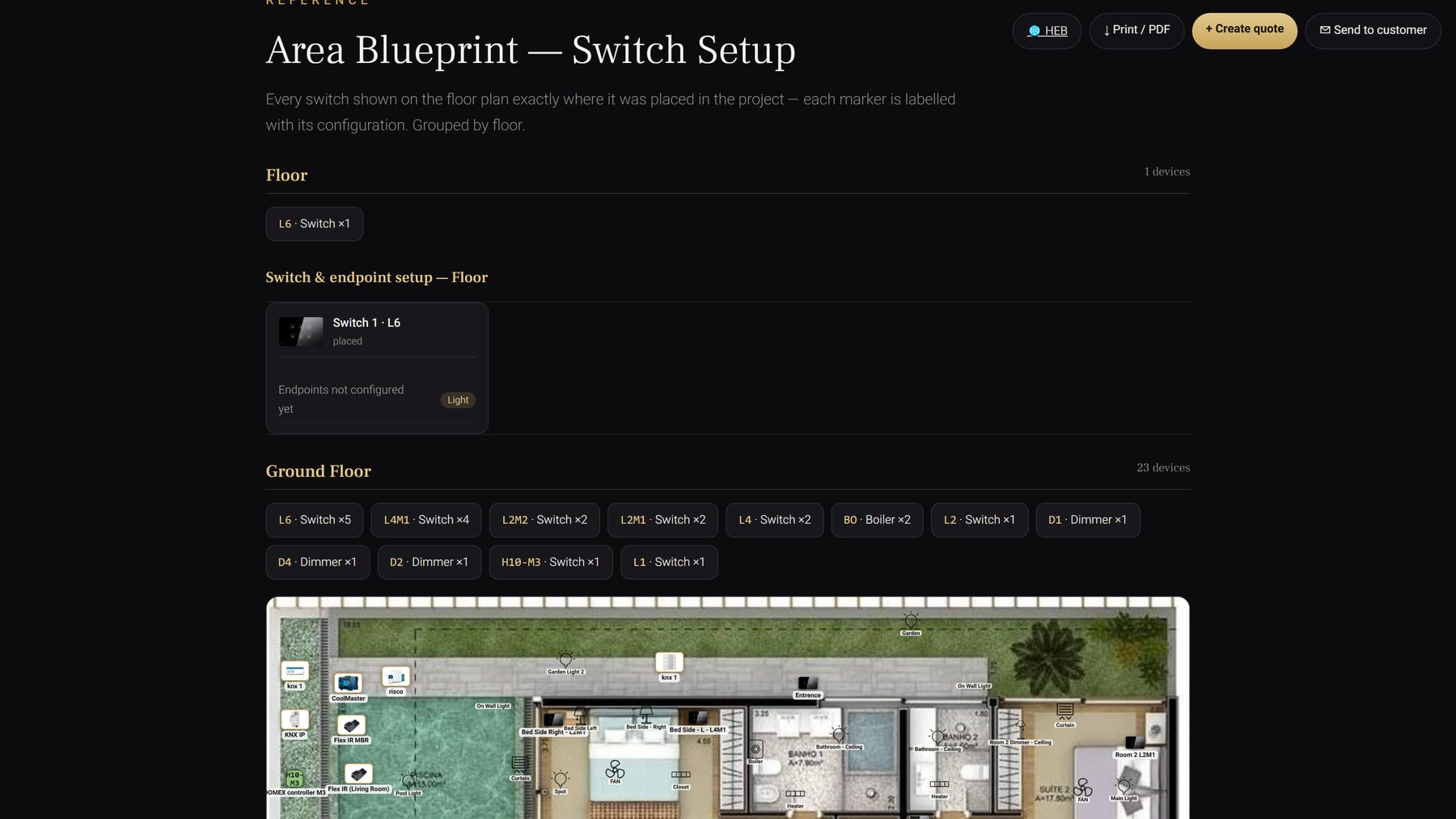
Every device in every area becomes a bill of materials automatically — and it presents as a designed document, not a spreadsheet. Print it, PDF it, or send it to the customer to approve from their own portal.

Domex quote cover — a smart electrical system for a private home
Cover — quote number, project and date
Quote keypad selector showing material, design, colour and orientation with a live preview
Your keypads — finish chosen live, SKU resolved
Quote proposal breakdown listing controllers and control units with quantities
Breakdown — devices, switches and floors, priced
Quote area blueprint showing every switch on the floor plan labelled by configuration
Area blueprint — every switch, exactly where it was placed
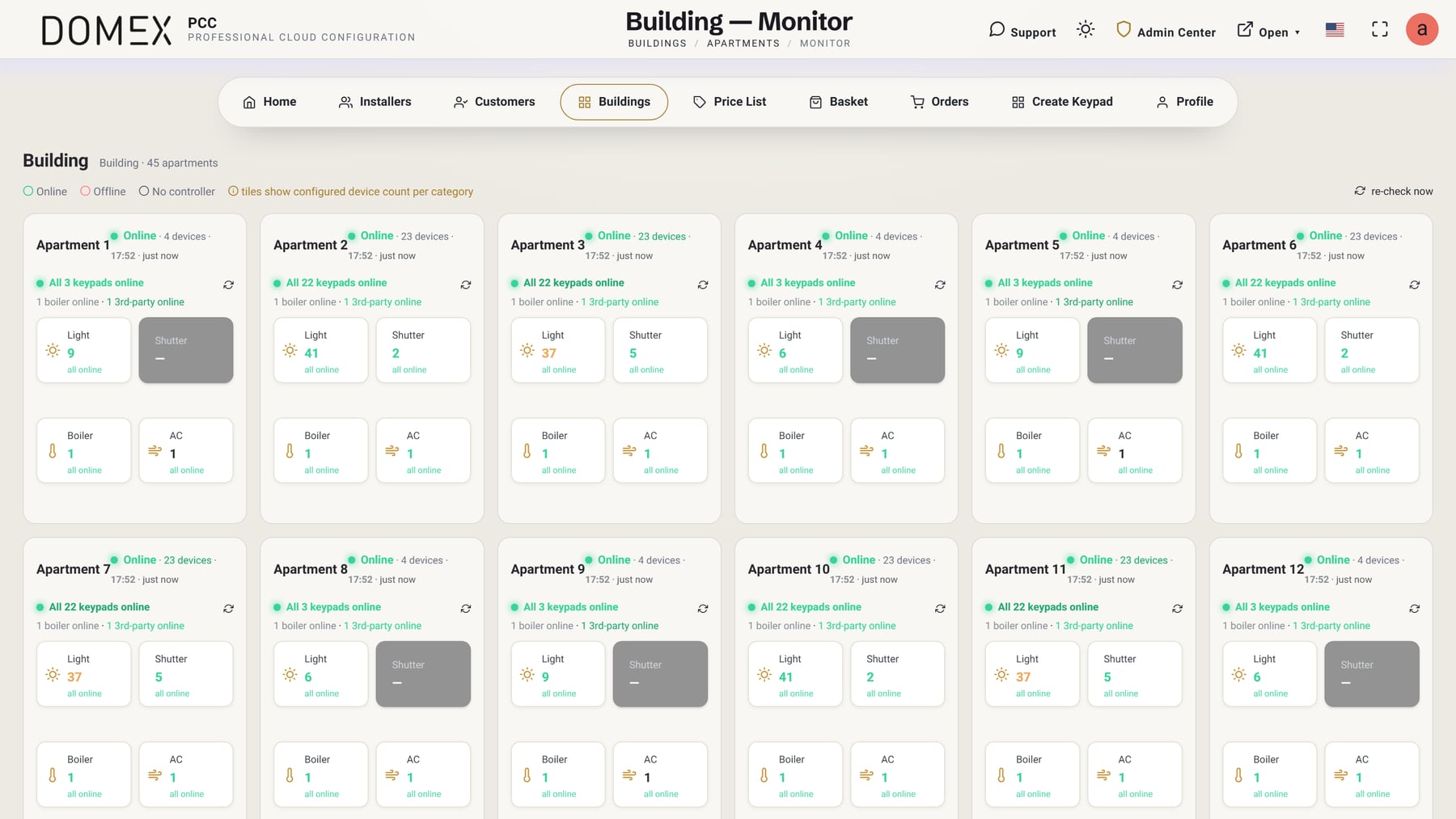
Step 05 · Building Monitor

Forty-five apartments, one screen.

After handover the system reports back. Every unit shows online or offline with a timestamp, keypads, boilers and third-party devices counted per category — and a one-click re-check when you need certainty right now.

  • Per-unit status across a whole residential building
  • Live readings — motion, temperature and occupancy per room
  • Lighting, shades and shutters reported as they change
  • Device counts by category — light, shutter, boiler, AC
  • Live in Domex PCC, wherever you are
Domex PCC building monitor showing live online status for 45 apartments
What you can do

Everything the business needs, in the cloud.

Your team, your customers

Add the installers who work for you and see everything they have in the field from one screen — customers, projects, orders, quotes and live system status. When someone needs a hand, open their account and help them directly.

Installers · customers · live status

Customers & projects

Create a customer in seconds with a CloudID — no email required to start building. Multi-unit buildings with per-floor units and duplication, plus blueprint dashboards: upload the floor plan, place the rooms, and the homeowner’s dashboard becomes their actual home.

Buildings & units · blueprint dashboards

Handoff & support access

When the install is done, hand the project to the homeowner — their own portal login, forced password change and Terms acceptance built in. After handoff the home is theirs: the dealer works on it only inside a granted support window, requested and accepted in the platform.

7 days or unlimited · always logged

Quotes & ordering

Build a quote straight from the project with revision tracking and a draft → sent → accepted lifecycle the customer approves from their own portal. Stock orders cover electronics and faceplates by gang, finish and orientation.

Per-region catalog · quote history

Pricing that’s always right

Your prices live in the platform, in your own currency. Every quote and every order prices itself the moment you build it — so the number you put in front of a customer is always the current one. No spreadsheets, no manual maths, nothing out of date.

Your prices · your currency · instant totals

Live monitoring

Real-time system status in Domex PCC — every controller reports in, with online/offline badges and one-click re-check. Building monitors show per-unit status across a whole residential project, and room-level changes push straight to dashboards.

Fleet analytics · per-unit monitors
How it works

Design it. Quote it. Install it. Monitor it.

01

Design

Configure the keypad on real faceplates, engrave it, and send the Artwork Approval for signature.

02

Quote

Build the customer quote from the project, revise it, and let the homeowner accept it from their portal.

03

Install

Order electronics and faceplates, commission on site, then hand the finished home over to its owner.

04

Monitor

Watch controllers live, support inside a granted window, and keep tuning long after handover.

Security & platform

Built to be trusted with a customer’s home.

Access is always explicit, logged and time-boxed — and the whole platform runs in the browser.

Email OTP (2FA) login Server-side sessions Idle auto-logout Forced first-login password change Terms & privacy gate GDPR-style delete requests Built-in support chat 100% web — nothing to install Multi-language & RTL Light & dark themes
For Domex professionals

Your entire smart-home business, in one cloud.

PCC is available to approved Domex distributors, dealers and installers. Sign in to the platform, or apply for a dealer account to get started.