Inside Domex PCC: Design, Quote, Engrave, Order and Monitor — One Cloud Platform

Every Domex home starts long before the first keypad goes on the wall. Someone designs the glass, prepares the quote, gets the engraving approved, orders the hardware, installs it, hands the home over — and then keeps an eye on it for years. At Domex, all of that happens in one place: Domex PCC, Professional Cloud Configuration.
Domex Cloud is the platform behind every Domex installation. PCC is the professional’s side of it — the workspace where distributors, dealers and installers design a keypad, quote the project, hand over the home and watch it live. There is nothing to install: it runs entirely in the browser, at domex.cloud.
This article walks through PCC the way a project actually flows: from the dealer portal, through the keypad designer, the customer quote, engraving approval and ordering, all the way to handover and live monitoring.
One cloud, four workspaces
PCC is built around the people who deliver a Domex home. Each one gets a workspace shaped to their job, and every account is identified by its own CloudID.
- Distribution — onboards, trains and backs the dealers in its region, and manages the regional price list.
- Dealer — runs the business: customers, projects, quotes, keypads, live monitoring and support.
- Installer — works inside a per-project context, scoped under the dealer, with exactly the access the job needs.
- Customer — controls the home from the Domex app or the web app, and manages who has access to it.
Professionals sign in with their email or CloudID, protected by a one-time email code (two-factor authentication), server-side sessions and automatic logout after a period of inactivity.
Step 1 — The dealer portal and the project
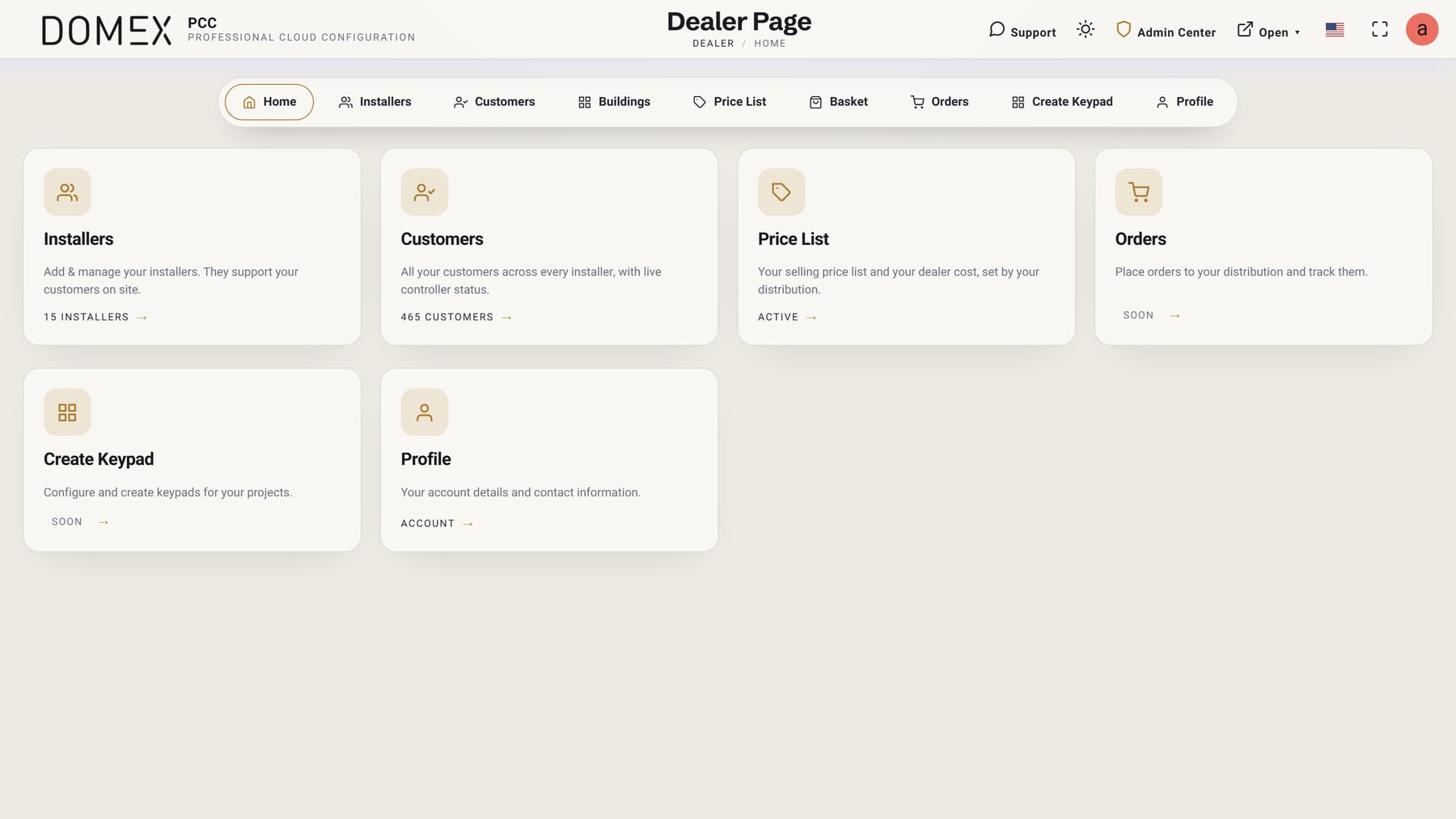
Everything begins in the dealer portal, with live counts of customers and projects. A new customer can be created without even having their email yet — perfect for a prospect at the quoting stage — and moves from Prospects to Customers as the project matures.
Inside a project, the dealer or installer uploads the floor plan and places devices directly on the blueprint: keypads, dimmers, boiler switches, thermostats, cameras, KNX and other third-party devices. The project is organised into Areas (rooms and zones), with an All Areas view and a Project Monitor view, and every device can be named, configured and associated with other controls.
Adding hardware is done from a device catalogue split into Domex products — such as the V1 Smart Controller, the H10 Genius controller, the R6 ElectroBox, the D6 dimmer, the smart boiler switch and the thermostat — and third-party products, including KNX, CoolMaster, IP cameras, intercoms and Risco. Settings can be exported, imported and applied to a site, so a proven configuration never has to be rebuilt from scratch.

For developers and hospitality, PCC goes beyond a single home: buildings and units can be created floor by floor, duplicated, and quoted together.
Step 2 — Create Keypad: a CAD-grade designer for real glass
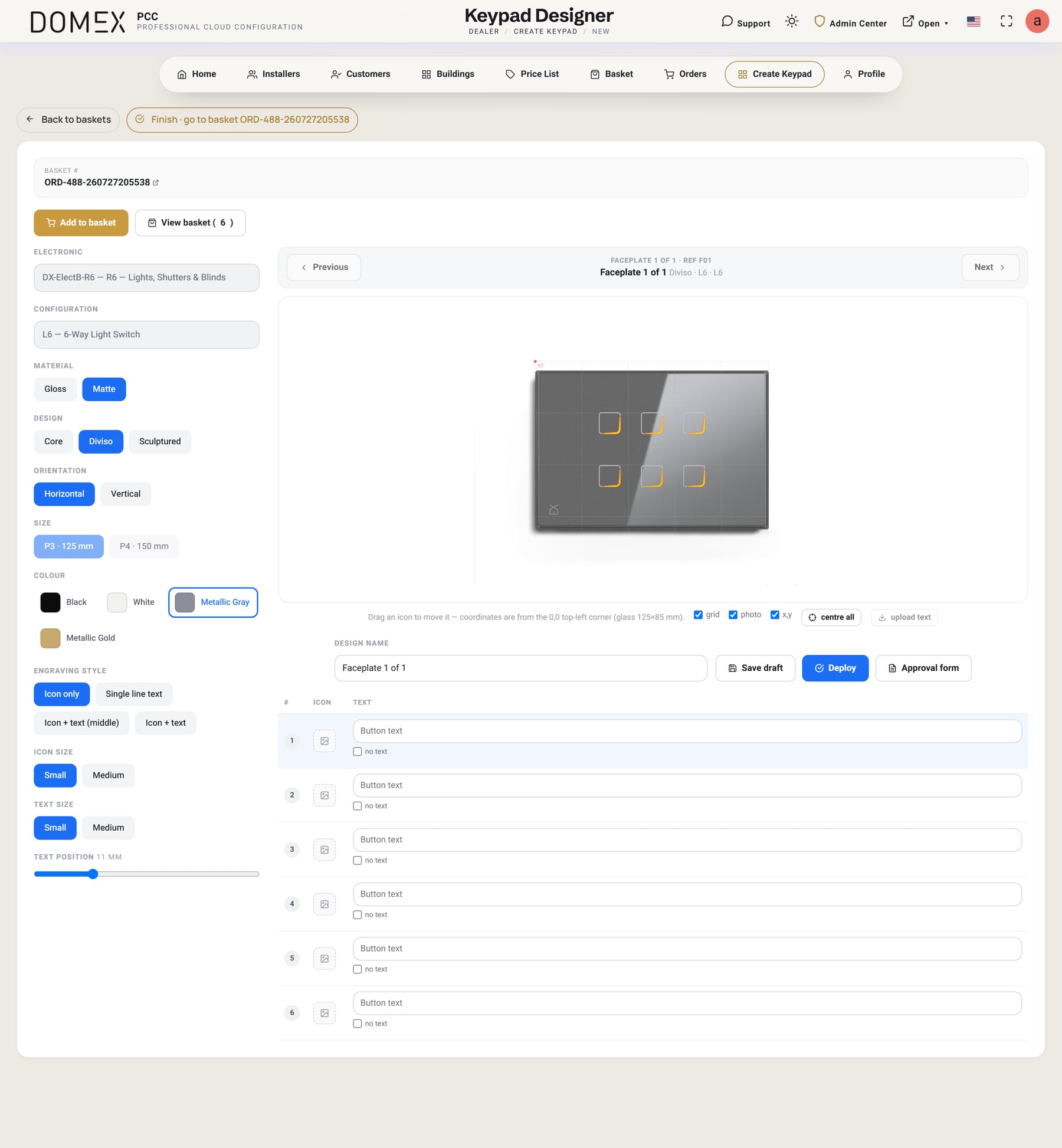
The heart of PCC is Create Keypad, a designer built for real glass at real size — 125 × 85 mm horizontal, or 85 × 125 mm vertical.
- Three styles — Core (round buttons), Diviso (rounded-square buttons) and Sculptured.
- Four colours — Black, White, Metallic Gray and Metallic Gold, each in gloss or matte.
- Configurations — from 1 to 9 light switches, shutter (motor) layouts, combined light-and-motor layouts, a Master keypad and blank-off plates. The vertical orientation is the one used for Crestron.
The engraving studio
Each button can carry an icon, text, or both. The Domex Design icon library offers 139 icons in 23 categories, and text can sit on one line, beside an icon or beneath it. The names the installer gave each device become the default labels automatically, so a living-room dimmer already says “Living Room” before anyone types a word.
Details that make the difference on real glass are built in: motor up/down pairs share a single label, text size and position are adjustable, positions can be read in millimetres, and a live LED preview shows how the backlit engraving will glow. Designers can switch between a vector blueprint view and a photo view, and step through every keypad in the project one after another.
A finished keypad can be saved as a draft, deployed to the basket, or printed as an Artwork Approval form.
Step 3 — Artwork Approval: what the customer signs
Before anything is produced, every engraved keypad gets an Artwork Approval: a one-page, print-ready PDF that shows the faceplate at true scale, with millimetre positions and a full specification — model, size, finish, colour, LED colour, icon and font details — and a space for the approval date.
It is the document the customer signs before production. Alongside it, PCC exports a true-size vector file for the engraving laser (ready for LightBurn), so what the customer approved is exactly what gets engraved.
Step 4 — The customer quote, built automatically
When the project is designed, Create Quote turns it into a complete proposal in one click. The bill of materials is generated from every device in every area: electronics grouped by type, one faceplate line per keypad, and a paired engraving line for each engraved keypad — with VAT and a grand total.
The result is a branded, dealer-logo proposal with clear pages: Cover, Your keypads, Breakdown and the Area blueprint. The dealer can print it, export it as a PDF, or send it for approval in the customer’s portal. Building projects can be quoted as one combined building quote.
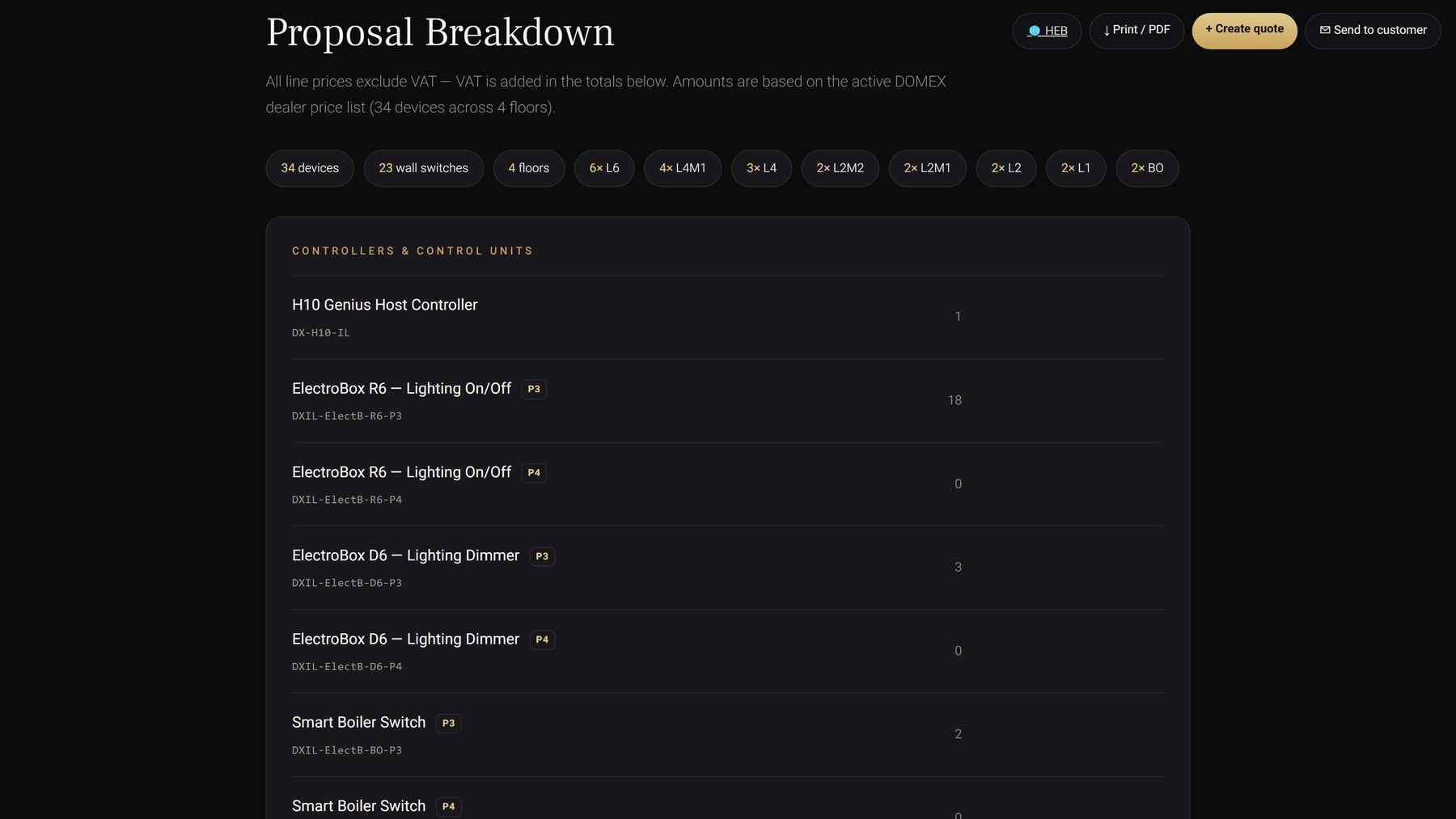
Quotes follow a clear lifecycle — draft, sent, accepted (or rejected and expired) — and every revision is kept, with the newest always the live one. Pricing works in the dealer’s own currency, based on the regional price list.
A price chain that respects the channel
Domex publishes regional price lists. Each distributor sets its own commercial terms — rebates, freight and customs, dealer discounts, margin, VAT, currency and exchange rate — so every dealer quotes from the right numbers without spreadsheets.
Step 5 — From basket to order
PCC connects design directly to ordering: Design → basket → order. Approved keypads go into the basket, become an order, and are sent to distribution. Each order line keeps its keypad design, so the glass, finish and engraving travel together from the designer to production.
Step 6 — Installation and handover
On site, the installer uses the Installation Page to commission the controller step by step: select the area, add the devices, and set up the controller — with live status for power, Z-Wave and cloud, firmware updates with progress, and controller backups.
When the home is ready, the dealer uses Hand off to customer. The customer receives a secure link to set their password and becomes the owner of the account. From that moment the home belongs to the homeowner — and the customer’s portal, My account & access, lets them:
- keep their details up to date;
- see which dealer or installer is authorised, and for how long;
- create app users for the family, each with its own room visibility.
Support access after handover is transparent: it can be granted for a limited time or without limit, and it is always logged.
Step 7 — Live monitoring
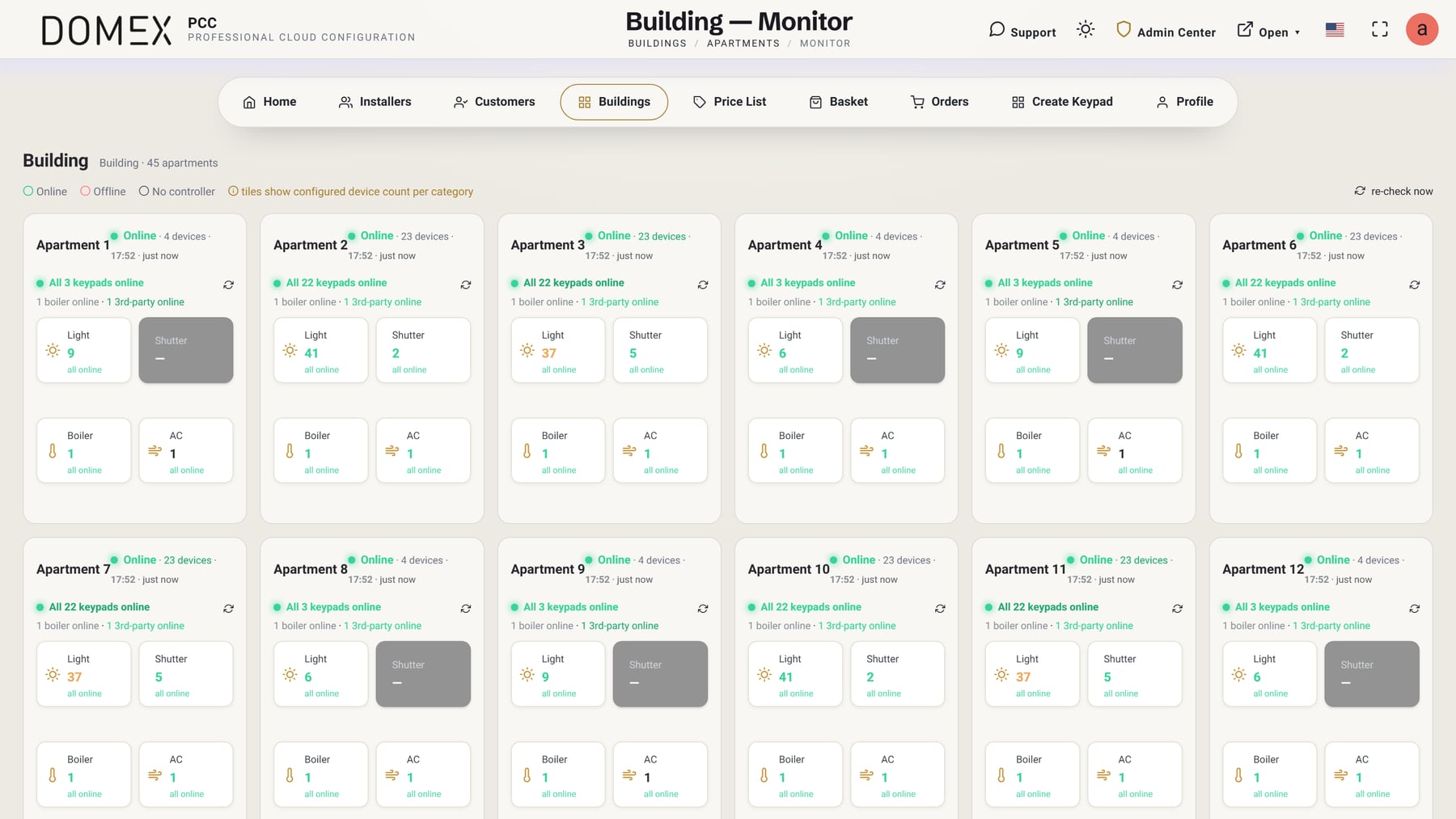
A Domex home does not disappear from view after handover. Controllers report to Domex Cloud live, and PCC shows every site’s status at a glance — online or offline, with a timestamp, and a one-click re-check.
The Building Monitor brings an entire development onto one screen: forty-five apartments, one view — with online and offline status, motion, temperature and occupancy, and device counts per category. When a controller or keypad goes offline or comes back, an alert appears in the message centre, so the dealer often knows about an issue before the homeowner does.
And when help is needed, a built-in Service & Support chat connects professionals with Domex, with automatic translation and answers drawn from the installer manual.
Built for real projects
PCC is designed for the way homes and buildings are actually delivered:
- 100% web — nothing to install, on any computer.
- Multi-language and right-to-left — including Hebrew, with Hebrew quotes for Israeli dealers.
- Light and dark themes.
- Security by default — email one-time codes, server-side sessions, automatic logout, a forced password change at first login, and a privacy and terms gate.
- Calendar-aware scenes — cloud scenes that can follow the Hebrew calendar, including Shabbat and holidays.
Design it. Quote it. Install it. Monitor it.
That is the promise of Domex PCC: one platform from the first keypad sketch to a live, monitored home. For homeowners, it means a project that is designed precisely, approved clearly and supported for years. For professionals, it means less paperwork, fewer mistakes and a business that runs from a single, secure cloud workspace.
Domex PCC is available to approved Domex distributors, dealers and installers. Learn more on the Domex PCC page, apply to become a Domex dealer, or find a certified Domex dealer to start your project.